/*Anim Super Menu by gtudiploma.blogspot.in */ -->
Upcoming
Lorem ipsum dolor sit amet, consectetur adipisicing elit, sed do eiusmod tempor incididunt ut labore et dolore magna aliqua. Your Link Here

Saturday, 20 July 2013

Secret Codes for Android Mobile Phones


Hello Friends, today i am going to share several secret codes for Android Mobile Phones. These Android  codes will help you to know more aboutAndroid mobiles and help you to explore more about your Android Phone. Android_by_fetuscakemix
Secret codes are those codes which are usually hidden from users for any misuse and exploit. As we all know android is very new platform from Google for smartphones.  I have tested these codes on my cousins Samsung Galaxy having an Android OS version 2.2. I am sure these will work on all previous versions. 
  
Disclaimer : Here i have given this information only because of study purpose. This codes may or may not harm your device. So we are not responsible for any changes that might happen toyour phone. Try at your own risk.
  

Complete Information About your Phone 


  • *#*#4636#*#*
Just dial this code it can be used to get some interesting information aboutyour phone and battery. It shows following 4 menus on screen: 
    • Phone information
    • Battery information
    • Battery history
    • Usage statistics

Factory data reset

  • *#*#7780#*#*
This code can be used for a factory data reset. It'll remove following things: 
    • Google account settings stored in your phone
    • System and application data and settings
    • Downloaded applications
It'll NOT remove: 
    • Current system software and bundled application
    • SD card files e.g. photos, music files, etc.
Note: Once you give this code, you get a prompt screen asking you to click on "Reset phone" button. So you get a chance to cancel your operation. 
  

Format Android Phone

  • *2767*3855#
Think before you give this code. This code is used for factory format. It'll remove all files and settings including the internal memory storage. It'll also reinstall the phone firmware. 
Note: Once you give this code, there is no way to cancel the operation unless you remove the battery from the phone. So think twice before giving this code. 
  

Phone Camera Update

  • *#*#34971539#*#*
This code is used to get information about phone camera. It shows following 4 menus: 
    • Update camera firmware in image (Don't try this option)
    • Update camera firmware in SD card
    • Get camera firmware version
    • Get firmware update count
WARNING: Never use the first option otherwise your phone camera will stop working and you'll need to take your phone to service center to reinstall camera firmware. 
  

5. End Call/Power

  • *#*#7594#*#*
This one is my favourite one. This code can be used to change the "End Call / Power" button action in your phone. Be default, if you long pressthe button, it shows a screen asking you to select any option from Silent mode, Airplane mode and Power off. 
You can change this action using this code. You can enable direct power off on this button so you don't need to waste your time in selecting the option. 
  

File Copy for Creating Backup

  • *#*#273283*255*663282*#*#*
This code opens a File copy screen where you can backup your media files e.g. Images, Sound, Video and Voice memo. 
  

Service Mode

  • *#*#197328640#*#*
This code can be used to enter into Service mode. You can run various tests and change settings in the service mode. 
  

WLAN, GPS and Bluetooth Test Codes:

  • *#*#232339#*#* OR *#*#526#*#* OR *#*#528#*#*     - WLAN test (Use "Menu" button to start various tests)
  • *#*#232338#*#*                  - Shows Wi-Fi MAC address
  • *#*#1472365#*#*                - GPS test
  • *#*#1575#*#*                     - Another GPS test
  • *#*#232331#*#*                  - Bluetooth test
  • *#*#232337#*#                    - Shows Bluetooth device address

To get Firmware version information:

  • *#*#4986*2650468#*#* - PDA, Phone, H/W, RFCallDate
  • *#*#1234#*#* - PDA and Phone
  • *#*#1111#*#* - FTA SW Version
  • *#*#2222#*#* - FTA HW Version
  • *#*#44336#*#* - PDA, Phone, CSC, Build Time, Change list number

To launch various Factory Tests:

  • *#*#0283#*#* - Packet Loopback
  • *#*#0*#*#* - LCD test
  • *#*#0673#*#* OR *#*#0289#*#* - Melody test
  • *#*#0842#*#* - Device test (Vibration test and Back Light test)
  • *#*#2663#*#* - Touch screen version
  • *#*#2664#*#* - Touch screen test
  • *#*#0588#*#* - Proximity sensor test
  • *#*#3264#*#* - RAM version
If you like this then please subscribe to Our feeds and Like us on Facebook for Future Updates. Thank you. 
| No comments:

Windows 8.1 release date, price and features

Updated: The Windows 8.1 preview has dropped, with the finished version slated for release in the autumn.

The Windows 8.1 preview is now officially available to download, with Microsoft expected to roll out the finished version of the product in the autumn.
The software giant showed off the new release at its Build developer conference in San Francisco earlier today, describing it as a more refined version of Windows 8.
The preview version of the OS is available to download here. At Microsoft's Worldwide Partner Conference earlier this week, CMO and CFO Tami Reller confirmed that the Windows 8.1 is nearing completion and that it will be rolled out to OEMs in late August. Devices will start shipping with the latest version of Windows in the holiday season, and existing Windows 8 users will be prompted to upgrade for free.
The future of Windows is very, very bright.
During the event’s opening keynote, Microsoft CEO Steve Ballmer confirmed the release will mark the return of the much-missed Start button, and that users will find it easier to switch between the desktop and modern user interfaces.
“We put Windows 8 systems in the market at the end of last year, and yet what you see and what we will show you...is a heck of a lot of movement, innovation and responsiveness all coming to market in a very [short] timeframe [with Windows 8.1],” he said.
The software giant has dismissed claims the release is an admission that Windows 8 has not sold as well, or won over users, in the same way as previous incarnations of the operating system.
Instead, the company has keenly stressed that Windows 8.1 is indicative of Microsoft’s decision to focus on shorter development cycles and – in turn – push out products faster to customers.
At Microsoft TechEd in New Orleans earlier this month, the company cited the forthcoming releases of its Windows Server 2012 R2 and System Center 2012 R2 - both of which were only launched last autumn - as evidence of its commitment to this faster product release strategy.
This was a point touched on during the keynote by Ballmer in his opening remarks, where he reiterated Microsoft’s focus on “rapid release” cycles.
“[This] rapid pace of innovation...it’s the new normal for everything we do...[and] we’ve undergone this transformation to move to a rapid release cycle,” said Ballmer.
"We stated clearly [that this is our] new rapid release cadence," he added.
Touch up on Windows 8.1
The company has also regularly come under fire from market watchers and end users since Windows 8 was launched, with many complaining the OS was difficult to use without a touch-enabled device.
This is something Microsoft is working to address with its OEM hardware partners, Ballmer assured, and users can expect to see a wider range of touch devices – including notebooks and smaller tablets – coming to market in future.
He also lamented the lack of touch devices available at the time of Windows 8’s launch, because users with touchscreen devices were “much happier” using the OS than those without, he claimed.
Many of Windows 8.1’s features have been publicly spoken about by Microsoft in recent weeks, and have been well documented in IT Pro’s exhaustive list of the operating systems’ key features, which can be found over the page.
During the keynote, the presenters also walked through a few others. These include using a device’s in-built camera as a sensor, which allows people to scroll through onscreen content by waving their hand in front of it.
Gesture controls have also been added to the software’s keyboard function to make predictive typing easier, and Microsoft also claims the OS is the first to provide native support for 3D printing.
Windows 8.1 applications
The release of Windows 8.1 will also mark the arrival of a revamped Windows Store, which Antoine Leblond, corporate vice president of Windows program management at Microsoft, promised developers would make it easier for users to find their apps.
He also promised their apps will work better on Windows 8.1, and that the company has introduced 5,000 APIs for them to take advantage of. He also reiterated the fact developers get to keep 80 per cent of the revenue for the lifetime of their app once it crosses over the $25,000 threshold.
Enterprise appeal
Whether or not the release will be enough to encourage enterprise users to embrace the new operating system is anyone's guess, but market watcher Forrester recently predicted that many businesses will skip Windows 8 because very few see the release as an improvement on what has gone before.
"With Windows XP's end-of-life date of April 8, 2014, rapidly approaching, most IT shops are still too focused on migrating to Windows 7 to bother with Windows 8 anytime soon, if at all," the analyst said in a statement.
"To be reasonably considered an enterprise standard, approximately half of company-issued PCs must run Windows 8 by the time Windows next hits the shelves. Windows 7 hit that mark. However, Forrester doesn't believe that Windows 8 will become the next commercial standard."
However, the firm did acknowledge that employee interest in Windows 8 is "very high", which suggests the operating system could find its way into businesses through BYOD schemes.
Over the page, we run through some of the standout features of Windows 8.1.

| No comments:

How To Make iPhone n Android Apps Free in 10 Minute [No Technical skill required]


You probably have an iPhone or Android, during using cool apps you might be wish if you can make an apps for your iPhone or Android, which is required a lot of knowledge of java, xml and iOS for developing   and apps, Don't worry you don't need required to make an simple website or your personal custom apps for iPhone n Android apps.
In my tutorial i'm making it for techfoke, which is a techno blog. so i'm gonna use facebook, youtube, twitter, website link, you can use it personally by adding your favorite video, music, and other stuff.  


Let's Make an Android/iPhone Apps Free...


Step 1 : Get register or login with your facebook on iBuildApp.com which allows you to make free apps for iPhone, Android, native iPad, and web apps.

Step 2 : On the Welcome back screen click on "Create Apps" and select "Native iPhone/Android app".

Step 3 : Now select a Template from 10 awesome templates according to your choice, i select "Custom App" to make unique mobile app for functional widgets for techfoke.

Step 4 : Enter your apps name and select platform, iOS for iPhone app, i select both and click on "Create".

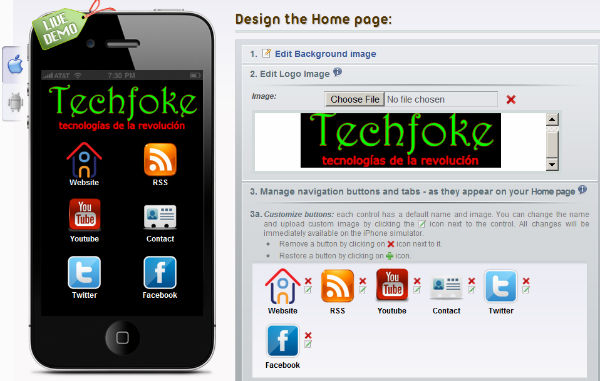
Step 5 : Its time to design Home Page, 

1. Click on "Edit Background Image" default background color is black, you can change color or images use pre-designed images or use your own image. images must be 320x480 pixels and less then 1 M.B. size.

2. Edit image Logo, make your own logo with paintbrush, photoshop or any other tool, logo resolution must be Height="82" and width="258".

3. Our selected template is Custom apps so there are some icon you can change the icon, delete them on your choice and add your own icon if you are good enough in photoshop or a good GFX guy. icon resolution must be 70x70 and size under 1 M.B. ( if you are smart guy like me , use iconfinder.com get some icon of size 128 pixel and use them it will automatically scale it. )


Step 6 : You have to link your site with various button, in the left side in live demo box click on your "Website" home button and you can write about your website provide link and edit with html code after this all save it. Just like it again go to Home Page of your Apps and Click on your "RSS" button, now in the right side in page type click on "Change Page Type" and select "News", give page tittle name, i given techfoke, now scroll down and check box of "use your RSS feed" and put your blog or website RSS feed , i use http://techfoke.blogspot.com/rss.xml for your blog you can use http://yourblogname.blogspot.com/rss.xml ,then check both box of "Share news via Email" , "Share news via SMS" for better content and click on "Save". 

*Just like this you can change all button with change page type, use twitter, facebook updates, insert music, Audio stream, Video stream, Google Map, Contacts details, Google Calender, Photo Gallery, Tap to call ( for iPhone), Ebook, Tap to Email, Events, Web, News, eCommerce, Coupons and add about your blog/website.

*After all this when you are sure your apps is ready, scroll down and click on "Continue"

Step 7 : Apps Setting, Now select mobile platform target i recommend you to select iOS and Android. next select time format by default there is 12 hours time format check box for 24 hours time format. now if you wish make an splash screen which will appear at time of lunching your apps, image resoultion must be 320x480 and file size under 1 M.B. now you can even earn $$$ by inserting your ads revenue from Google mobile ads, admob.com or can use your own add with html, i'm selecting No "Advertisement" and click on "save" and then click on "continue".

Step 8 : Now fill some information about your apps like name, categories, description, about your company blog url, apps logo but image can be in .png , .gif , .jpg , and 512x512 resolution and click on "continue".

Step 9 : Now don't confuse on in this step firstly we we publish it for android, now select android icon , it's totally free. click on Generate certificate (it will generate MD5 fingerprint which is unique identity of your apps ), now you'll see something like "EC:02:1A:F2:79:E6......" copy this md5 fingerprint, now you have to set up your Maps API key at code.google.com, just sign up here and paste your md5 fingerprint, check box of TOS and click on "generate api key", you'll see your api key just copy it. now back to our project and paste into the box "Enter your maps api key". Now enter the build version 1, 1.0, 1.1.2 or 2.0 (it will appear at app store). now you can even remove ibuiltapp label from your apps which is again FREE, and click on "Continue". - See more at: http://techfoke.blogspot.in/2011/12/how-to-make-android-apps-free-in-10.html#sthash.y3Hx3UJK.dpuf
| No comments:

Top 5 Websites To Learn How To Hack Like A Pro

You might be surprised to learn just how many people want to learn how to hack. The stereotype is that of the young college guy – a computer science major for sure – who spends his evenings and weekends writing up intricate hacking scripts to break into whatever computer system he can get his hands on.
The truth is that what was once a male-dominated community is fast changing into one that includes folks – men and women – from many walks of life, from many countries and with many backgrounds. A recent CNET article about DEFCON makes note of the fact that claims of sexual harassment and unwanted advances are increasing. This isn’t because hackers are getting more obnoxious or offensive, but because more female hackers are entering into the community and trying to find a home there, only to find insulting behavior, and other actions unbecoming of a gentleman.
This is the natural evolution of such communities, and in time the scales will balance and men and women will hack side by side – but when searching for places to go online to learn how to hack, it’s important to remember that because demographics and the world itself is changing, what you’ll find at most of the hacker websites are also changing significantly as well. Platforms in use are shifting from computer-based to more mobile and tablet hacking efforts, there’s much greater emphasis on social networks and the many hacks that are possible there, and all of the other new technologies and hacker tools available. The sites that keep up with these changing times will survive, while those that are stuck in the decades-old mentality of hackerdom-gone-by are doomed to fail.

Where You Can Go To Learn How To Hack Like a Pro

There’s a caveat that I have to share before diving into these sites. Hacking isn’t a single subject that anyone can pick up overnight. In the title of this article, I mention hacking like a pro. This can not be accomplished after reading one article and visiting a few of these sites – the phrase is used to imply that in time and with lots of practice, you can in fact learn to hack like a pro.
For our many readers that are already at that expert-hacker level, a few of these sites may not be for you. They may feel to simple and basic – for “script-kiddies” as some might say. The truth is, we all had to start somewhere, and these websites are offered as a starting point for those people just embarking down the wrote toward hackerdom.
Your intention for learning how to hack is completely your own. I do not judge. However, it should be noted that there are two forms of hacking – “white hat” and “black hat”.  White hat hackers call themselves “ethical hackers”, in that they find vulnerabilities simply to make systems and applications more secure for everyone. However, there’s a whole othercommunity of hackers – the black hats – who find vulnerabilities only to exploit them as much as possible. Now that you know what sort of community you may be entering, let’s get on with the list of top sites where you can learn to hack.

#1 – Hacking Tutorial: Tech Tips and Hacking Tricks

Sometimes, perfect English isn’t everything. Hacking Tutorial is an example of when the writing skill of the author doesn’t necessarily equate to the quality of his or her technical knowledge. This is actually the case over at Hacking Tutorial, where the author offers articles like “Client Side Attack Using Adobe PDF Escape EXE Social Engineering”, “Exploiting MS11_003 Internet Explorer Vulnerability”, and “Hacking Using BeeF XSS Framework”.
howtohack1
The articles are usually short, but actually offer highly technical, step-by-step instructions on how to do the task at hand, and the tricks and tweets absolutely work, unless the exploit has been patched.  It’s a small blog, but it’s a good one for the volume of technical tricks that you’ll find there.

#2 – EvilZone Hacking Forums

While the name, EvilZone, isn’t exactly the most inviting – it is easily one of the largest forum communities that you’ll find on the subject of hacking. With over 13,042 members and over 50,000 posts (and counting), this community likely has the skills and knowledge to answer any programming question you could possibly have. Just be careful about coming across as a “noob” – these guys don’t handle newcomers with kid gloves, so be careful.
howtohack2
You’d definitely be best off working through the programming and encyclopedia sections first, where you’ll find areas with projects, tutorials and a lot more that will help you become educated and well-versed in hacking techniques and terminology.

#3 – Hack a Day

While I certainly don’t want to offer a nod to any blogs that may be considered competition, you really have to give credit where credit is due when it comes to a particular niche like hacking – and Hack a Day definitely offers an amazing library of information for anyone looking for specific categories like cellphones, GPS or digital cameras. Over the years, Hack A Day has transformed the site into a fairly popular blog.
howtohack3
More than any other site, this particular “hacking” site is very much hardware based, and they redefine the meaning of the word hacking by helping you learn how to hack up electronic devices like a Gameboy or a digital camera and completely modifying it, or building electronics for the sole purpose of hacking other commercial devices. You’ll also find a popular and busy forum section as well – a high point of the site.
howtohack4
While I personally don’t find the articles themselves very detailed (as an EE, I like schematics and elaborate descriptions), the site makes up for it with video demonstrations throughout.

#4 – Hack In The Box

Hack In The Box has really change significantly through the years. It is rebranded as HITB, and the site is completely transformed into what looks like a WordPressed-based platform. Still, today Hack In The Box remains focused on security and ethical hacking. However, it has obviously shifted gears at some point and changed to a more content-focused approach with a greater volume of news, and fewer in-depth articles with detailed hacks.
howtohack5
This transition makes it less of a place to go for actually technical hacking tips, and more of a daily spot to get your latest fix of hacking news. The site is updated frequently, and of course you can also go for the print version of the HITB-branded magazine if you want.
howtohack6
Clearly, HITB has gone very commercialized, but it is a great resource for news for anyone interested in the latest gossip throughout the hacking community.

#5 – Hack This Site!

As always, saving the best for last – I’d like to introduce Hack This Site! This website is one of the coolest, free programmer training sites where you can learn how to hack accepting one of the challenges along the left navigation pane of the main page.
howtohack7
The site designers offer various “missions,” where you need to figure out the vulnerability of a site and then attempt to use your new-found hacking skills (you’ve carefully studied all of the articles on the site, right?) to hack the web page. Missions include Basic, Realistic, Application, Programming and many others.
download free hack software
If you’re able to figure out how to properly hack any of the most difficult missions on this site, then you’ve definitely earned the title of professional hacker.
Have you ever tried any of the tips offered at any of these websites and do they work? Do you have any good resources of your own for readers to learn how to hack like the pros? Share your insight in the comments section below.
| No comments:

Friday, 19 July 2013

SEO- Networking-SQL Books

Labels:
Note: If you want any thing download then go to link and press CTRL + S. Link is given on content name.

| No comments:

Adobe Books

Labels:
| No comments:

C++ Books

Labels:


| No comments:

Difference Between POP & OOP

Labels:
Difference Between Procedure Oriented Programming (POP) & Object Oriented Programming (OOP)
Procedure Oriented ProgrammingObject Oriented Programming
Divided IntoIn POP, program is divided into small parts called functions.In OOP, program is divided into parts called objects.
ImportanceIn POP,Importance is not given to data but to functions as well as sequence of actions to be done.In OOP, Importance is given to the data rather than procedures or functions because it works as areal world.
ApproachPOP follows Top Down approach.OOP follows Bottom Up approach.
Access SpecifiersPOP does not have any access specifier.OOP has access specifiers named Public, Private, Protected, etc.
Data MovingIn POP, Data can move freely from function to function in the system.In OOP, objects can move and communicate with each other through member functions.
ExpansionTo add new data and function in POP is not so easy.OOP provides an easy way to add new data and function.
Data AccessIn POP, Most function uses Global data for sharing that can be accessed freely from function to function in the system.In OOP, data can not move easily from function to function,it can be kept public or private so we can control the access of data.
Data HidingPOP does not have any proper way for hiding data so it is less secure.OOP provides Data Hiding so provides more security.
OverloadingIn POP, Overloading is not possible.In OOP, overloading is possible in the form of Function Overloading and Operator Overloading.
ExamplesExample of POP are : C, VB, FORTRAN, Pascal.Example of OOP are : C++, JAVA, VB.NET, C#.NET.
| No comments:
Sponsors : Best Themes | New WP Themes | Best Blogger Themes
Copyright © 2013. Android Jelly Bean - All Rights Reserved
Template Design by Shihara | Published by New Blog Themes
Powered by Blogger
Blogger Widgets